

Bank statements
Statements in. Balanced rows out.
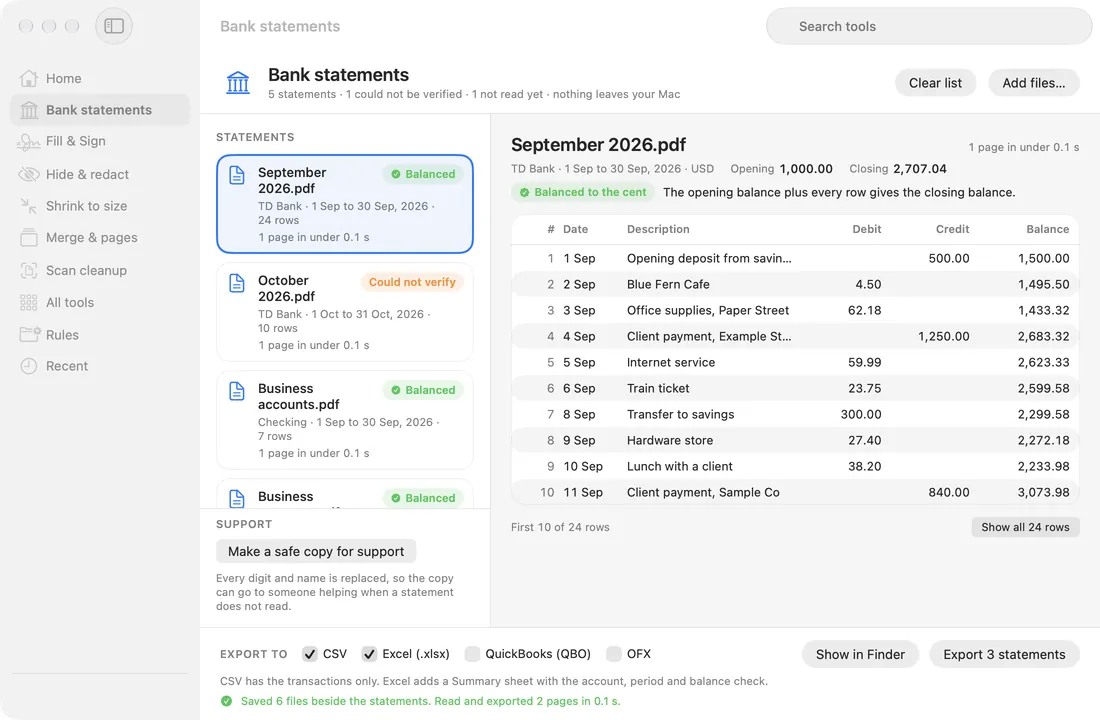
Drop PDF statements, text or scanned, and get every transaction as date, description, debit, credit and running balance. Each file is saved beside its statement.
- CSV
- Excel (.xlsx)
- QuickBooks (QBO)
- OFX

- US and Canadian statement layouts tested, in English and French.
- A statement that does not add up shows its rows in orange and is never exported silently.
- Several statements of 1 account can go into 1 sheet, in date order.
Opening 1,000.00+Credits 3,090.00−Debits 1,382.96=Closing 2,707.04
Balanced to the centEvery running balance follows too, so it is ready to export.
Opening 1,000.00+Credits 3,690.00−Debits 1,382.96=3,307.04, not the printed 2,707.04
Could not verifyThe running balance does not follow from the amounts at row 4. Dropwell keeps it back unless you choose Export anyway, which marks every row Unverified.
Example figures. Dropwell runs the same check on every statement it reads.


